> ## Documentation Index
> Fetch the complete documentation index at: https://docs.tracecat.com/llms.txt
> Use this file to discover all available pages before exploring further.
# Custom fields
> Store workspace-specific data on every case, such as ticket IDs, affected hosts, verdicts, and analyst notes.
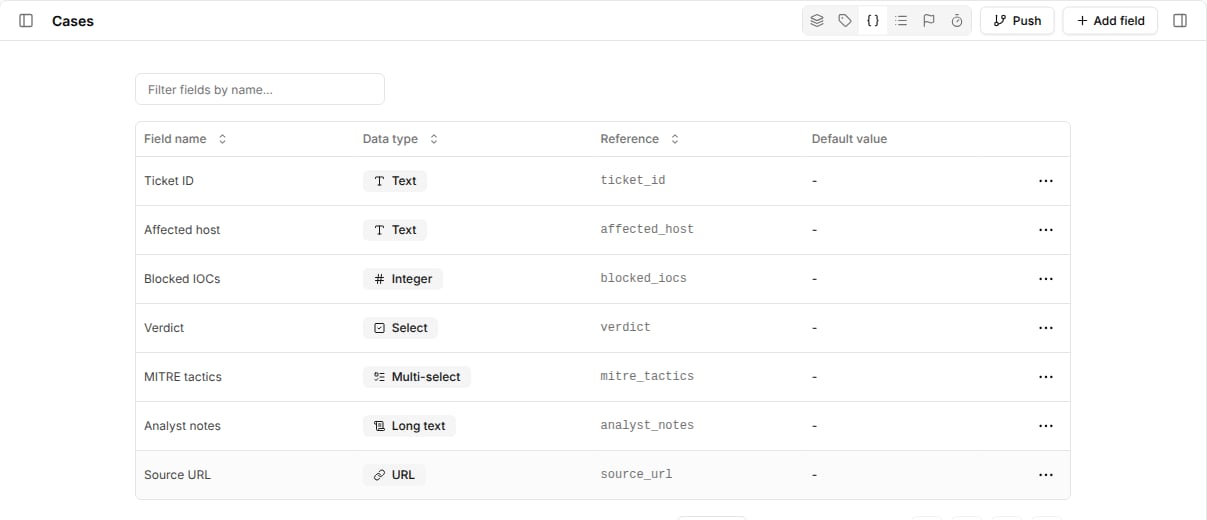
Custom fields store case data that does not fit the built-in properties.
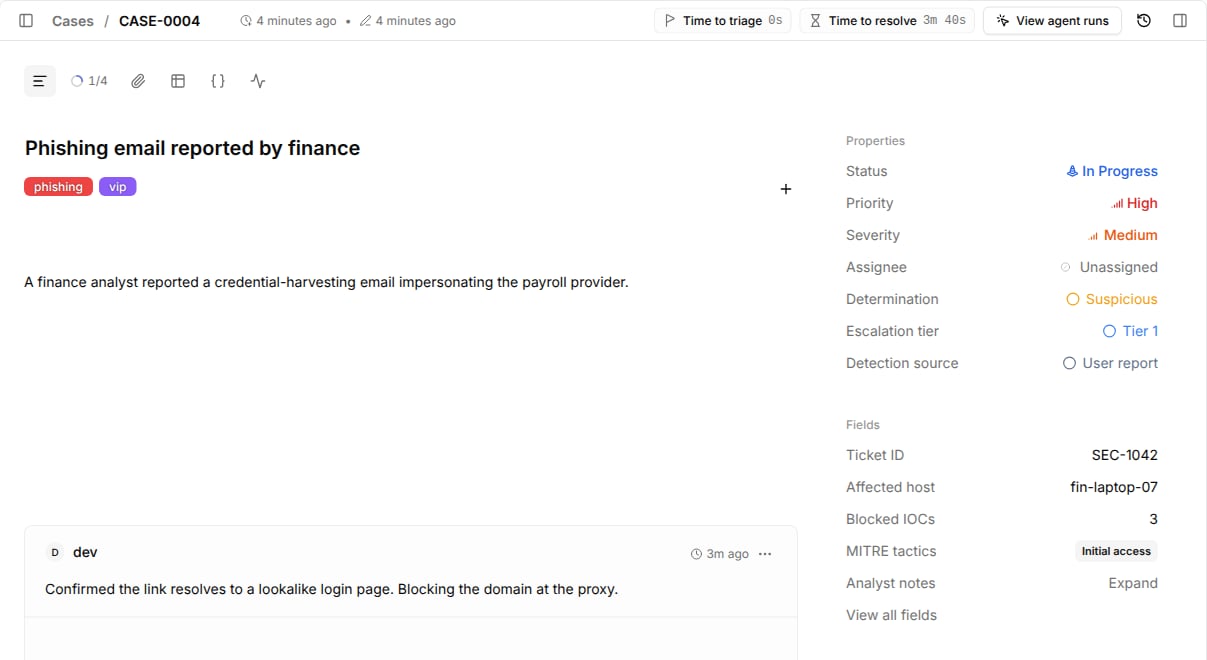
Every case in the workspace shows the same set of fields under `Fields` in the case side panel, and your workflows read and write them by reference.
 ## Create a field
1. Go to `Cases` and open the custom fields view from the header toolbar.
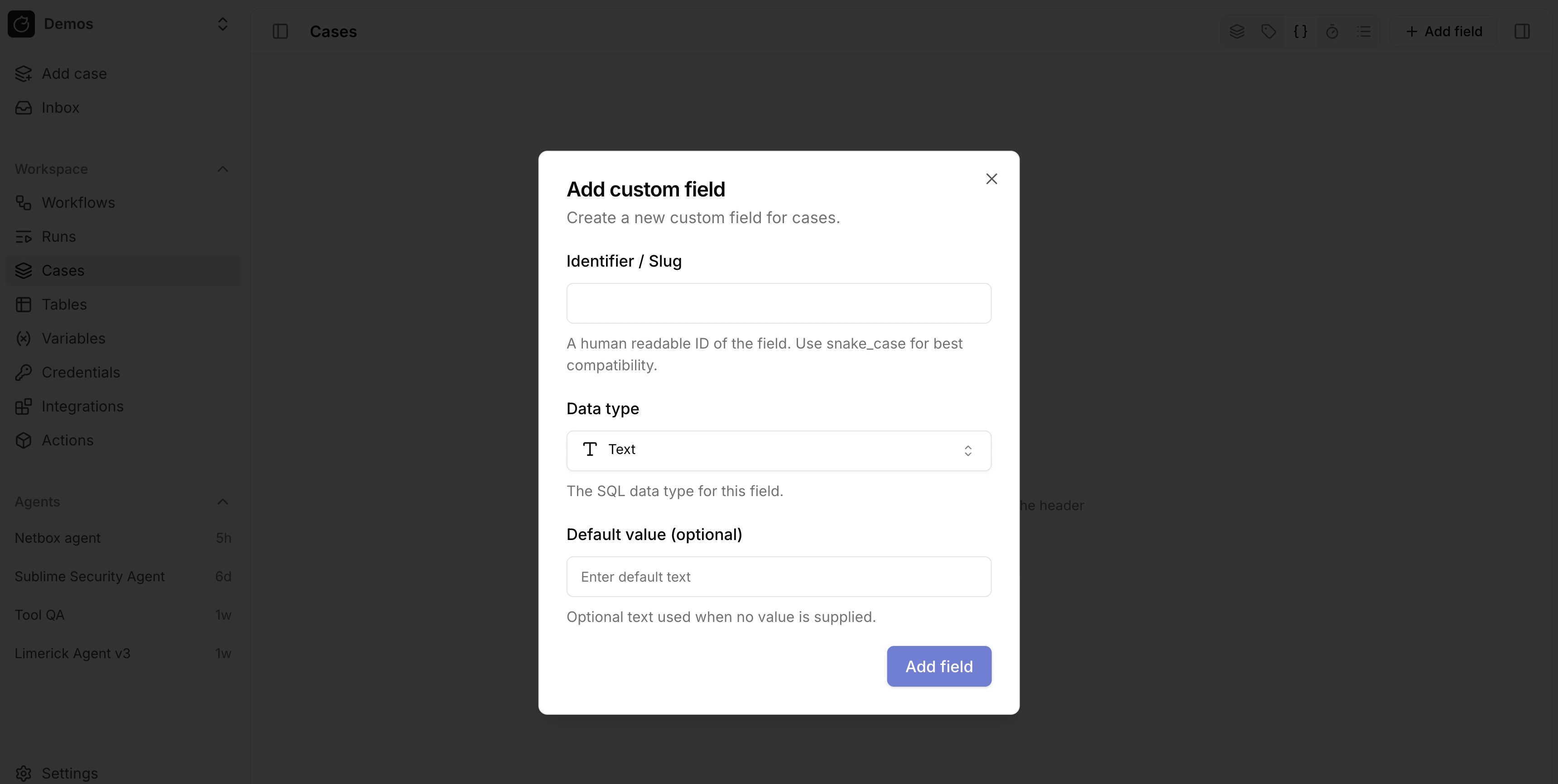
2. Select `Add field`.
3. Enter a `Name`. Tracecat derives the field reference from the name and shows it under the input, such as `Analyst verdict` → `analyst_verdict`.
4. Choose a `Data type`.
5. For `Select` and `Multi-select`, add the allowed `Options`.
6. Optionally set a default value.
## Create a field
1. Go to `Cases` and open the custom fields view from the header toolbar.
2. Select `Add field`.
3. Enter a `Name`. Tracecat derives the field reference from the name and shows it under the input, such as `Analyst verdict` → `analyst_verdict`.
4. Choose a `Data type`.
5. For `Select` and `Multi-select`, add the allowed `Options`.
6. Optionally set a default value.
 ## Data types
| Data type | Stores | Example |
| - | - | - |
| `Text` | Single-line text | `SEC-1042` |
| `Long text` | Multi-line text, expandable in the side panel | Analyst notes |
| `Integer` | Whole numbers | `3` |
| `Number` | Decimal numbers | `7.5` |
| `Boolean` | `true` or `false` | `true` |
| `Date` | Calendar date | `2026-10-09` |
| `Date and time` | Date and time with time zone | `2026-10-09T01:48:00Z` |
| `JSON` | Any JSON value | `{"host": "build-02"}` |
| `URL` | A link with an optional label | `{"url": "https://mail.example.com/msg/1042", "label": "Original email"}` |
| `Select` | One value from a fixed list | `True positive` |
| `Multi-select` | Several values from a fixed list | `["Execution", "Persistence"]` |
`Long text` is stored as `TEXT` and `URL` is stored as `JSONB`; the data type only changes how the case UI renders the value.
Use a [dropdown](/automations/cases/dropdowns) instead of a `Select` field when you want the values to appear as a case list filter with colors and icons.
## Edit values on a case
Open a case and edit values under `Fields` in the side panel.
Select `View all fields` to see every field, including empty ones.
Field values persist when the case changes status.
## Read and write fields from workflows
Pass a `fields` object keyed by field reference to `core.cases.create_case` or `core.cases.update_case`.
`update_case` only changes the keys you pass.
```yaml theme={null}
- ref: update_case
action: core.cases.update_case
args:
case_id: ${{ TRIGGER.case_id }}
fields:
ticket_id: SEC-1042
affected_host: ${{ ACTIONS.lookup_host.result.hostname }}
blocked_iocs: 3
mitre_tactics:
- Initial access
```
Tracecat rejects keys that do not match an existing field reference.
To start a workflow when a field changes, select `fields_changed` in a [case trigger](/automations/cases/workflow-triggers).
## Related pages
* See [Dropdowns](/automations/cases/dropdowns) to add colored, filterable classifications to cases.
* See [Closure requirements](/automations/cases/closure-requirements) to require a field before a case is closed or resolved.
* See [Cases](/automations/core-actions/case-actions/cases) for the case action inputs that read and update fields.
This documentation is built and hosted on [Mintlify](https://mintlify.com), a developer documentation platform.
## Data types
| Data type | Stores | Example |
| - | - | - |
| `Text` | Single-line text | `SEC-1042` |
| `Long text` | Multi-line text, expandable in the side panel | Analyst notes |
| `Integer` | Whole numbers | `3` |
| `Number` | Decimal numbers | `7.5` |
| `Boolean` | `true` or `false` | `true` |
| `Date` | Calendar date | `2026-10-09` |
| `Date and time` | Date and time with time zone | `2026-10-09T01:48:00Z` |
| `JSON` | Any JSON value | `{"host": "build-02"}` |
| `URL` | A link with an optional label | `{"url": "https://mail.example.com/msg/1042", "label": "Original email"}` |
| `Select` | One value from a fixed list | `True positive` |
| `Multi-select` | Several values from a fixed list | `["Execution", "Persistence"]` |
`Long text` is stored as `TEXT` and `URL` is stored as `JSONB`; the data type only changes how the case UI renders the value.
Use a [dropdown](/automations/cases/dropdowns) instead of a `Select` field when you want the values to appear as a case list filter with colors and icons.
## Edit values on a case
Open a case and edit values under `Fields` in the side panel.
Select `View all fields` to see every field, including empty ones.
Field values persist when the case changes status.
## Read and write fields from workflows
Pass a `fields` object keyed by field reference to `core.cases.create_case` or `core.cases.update_case`.
`update_case` only changes the keys you pass.
```yaml theme={null}
- ref: update_case
action: core.cases.update_case
args:
case_id: ${{ TRIGGER.case_id }}
fields:
ticket_id: SEC-1042
affected_host: ${{ ACTIONS.lookup_host.result.hostname }}
blocked_iocs: 3
mitre_tactics:
- Initial access
```
Tracecat rejects keys that do not match an existing field reference.
To start a workflow when a field changes, select `fields_changed` in a [case trigger](/automations/cases/workflow-triggers).
## Related pages
* See [Dropdowns](/automations/cases/dropdowns) to add colored, filterable classifications to cases.
* See [Closure requirements](/automations/cases/closure-requirements) to require a field before a case is closed or resolved.
* See [Cases](/automations/core-actions/case-actions/cases) for the case action inputs that read and update fields.
This documentation is built and hosted on [Mintlify](https://mintlify.com), a developer documentation platform.