> ## Documentation Index
> Fetch the complete documentation index at: https://docs.tracecat.com/llms.txt
> Use this file to discover all available pages before exploring further.
# Custom registry
> Sync custom Python and YAML actions into Tracecat through your own registry: version, share, and reuse organization-specific automations across workspaces.
You can build your own actions and use them in agents and workflows through Tracecat's custom registry feature.
## Why use a custom registry
* Version control your code separate from Tracecat
* Reuse your custom actions in multiple agents and workflows
* Easily update your custom actions across all agents and workflows
## Permissions
Custom registry is an organization-level feature and syncs across all workspaces.
You must have the "Organization Admin" role to add and manage the custom registry.
## Installation
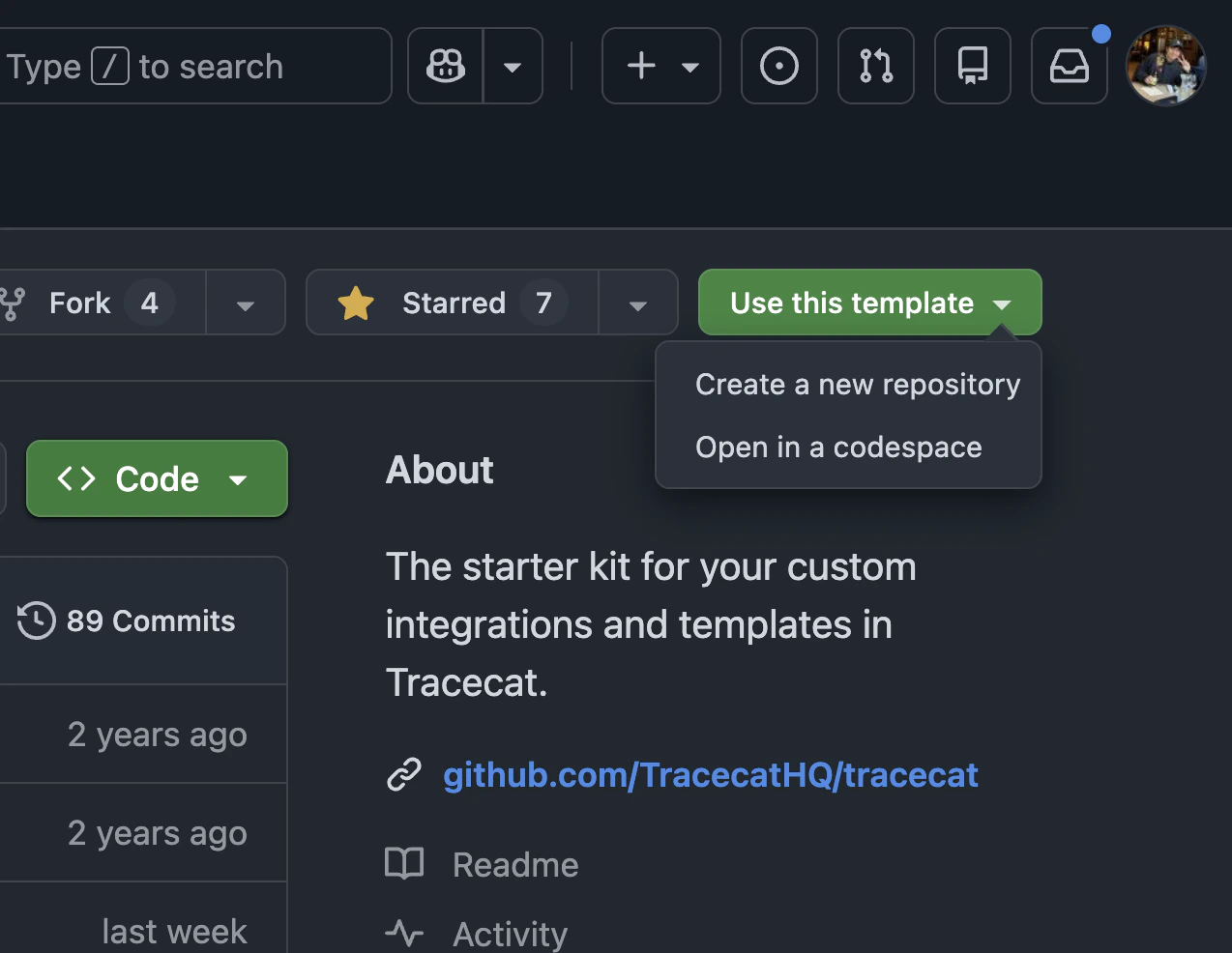
Clone the [custom registry starter kit](https://github.com/TracecatHQ/custom-integrations-starter-kit) from GitHub.
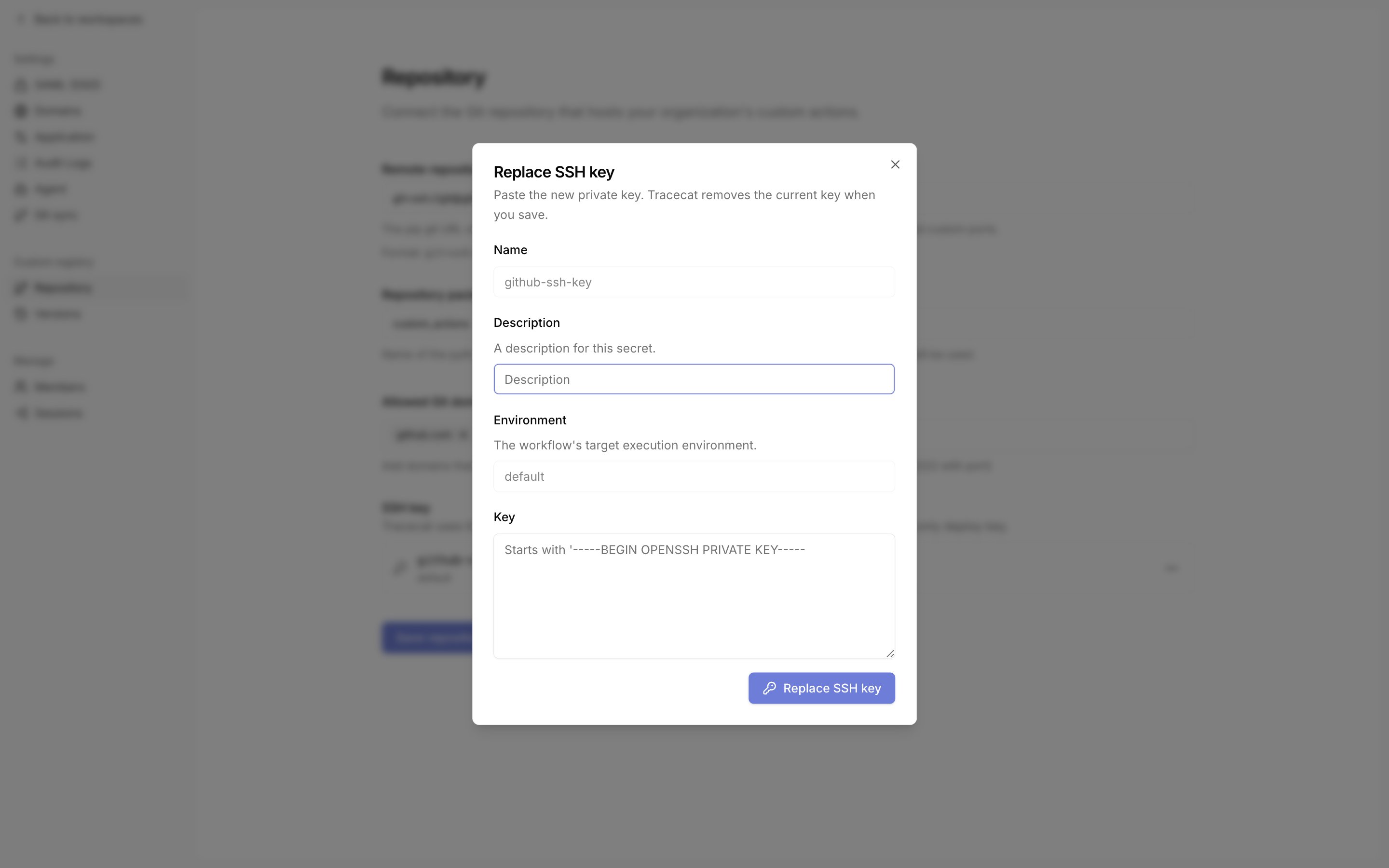
 Tracecat clones the repository over SSH.
Generate an SSH key pair and add the public key to the repository as a read-only deploy key (GitHub: repository Settings -> Deploy keys).
Go to Organization settings -> Custom registry -> Repository, click "Add SSH key" in the SSH key section, and paste the private key.
The name is fixed to `github-ssh-key` and the environment to `default`. Tracecat looks the registry key up by this exact name, whichever Git host you use.
To rotate the key, click "Replace SSH key" in the same section.
Tracecat clones the repository over SSH.
Generate an SSH key pair and add the public key to the repository as a read-only deploy key (GitHub: repository Settings -> Deploy keys).
Go to Organization settings -> Custom registry -> Repository, click "Add SSH key" in the SSH key section, and paste the private key.
The name is fixed to `github-ssh-key` and the environment to `default`. Tracecat looks the registry key up by this exact name, whichever Git host you use.
To rotate the key, click "Replace SSH key" in the same section.
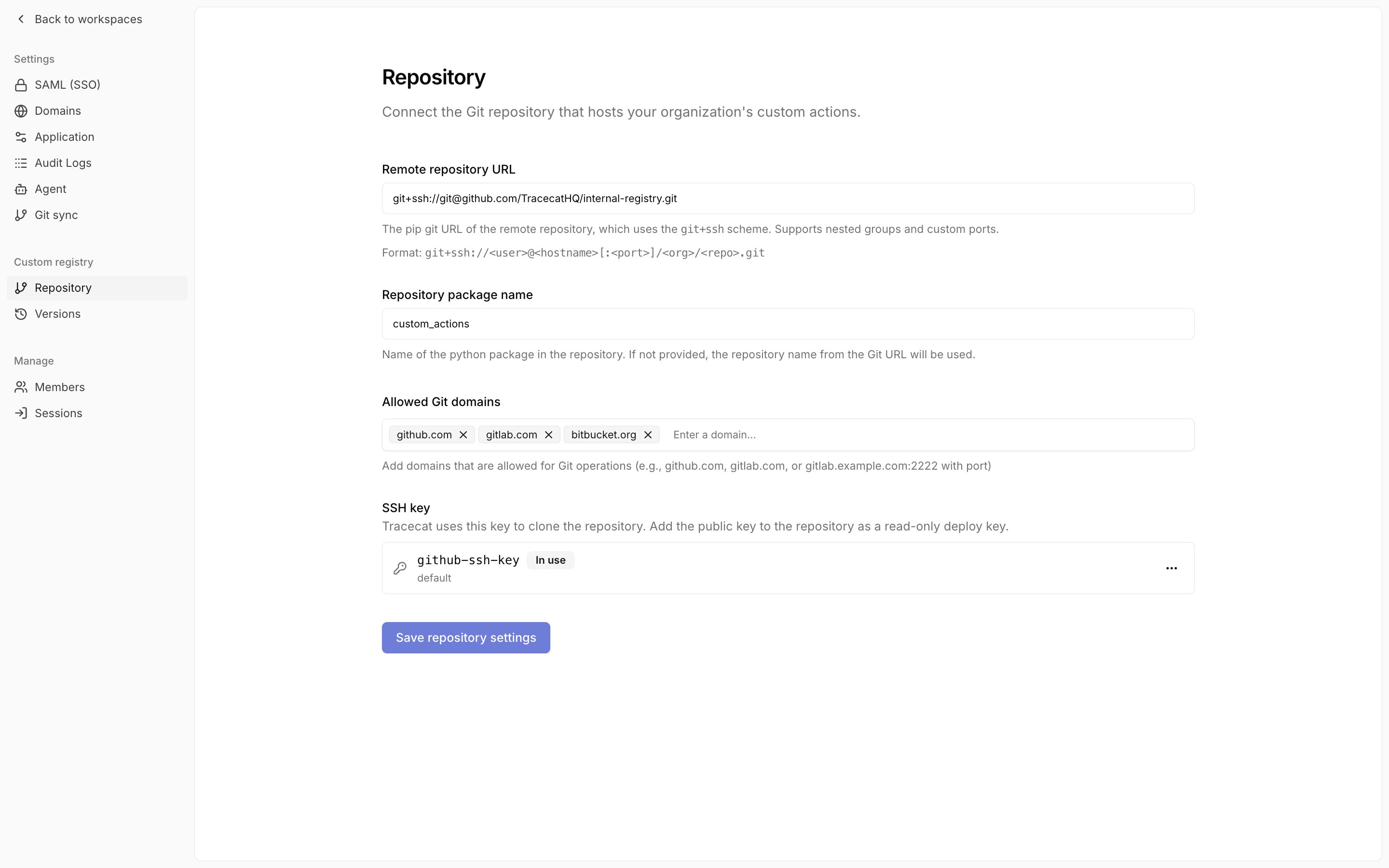
 Go to Organization settings -> Custom registry -> Repository.
Set the remote repository URL, repository package name, and allowed Git domains, then click "Save repository settings".
The remote repository URL is a pip URL of the form `git+ssh://git@github.com/your-org/your-repo.git`.
The package name is the name of the Python package (e.g. the parent folder named `custom_actions` in the starter kit) in the repo.
Go to Organization settings -> Custom registry -> Repository.
Set the remote repository URL, repository package name, and allowed Git domains, then click "Save repository settings".
The remote repository URL is a pip URL of the form `git+ssh://git@github.com/your-org/your-repo.git`.
The package name is the name of the Python package (e.g. the parent folder named `custom_actions` in the starter kit) in the repo.
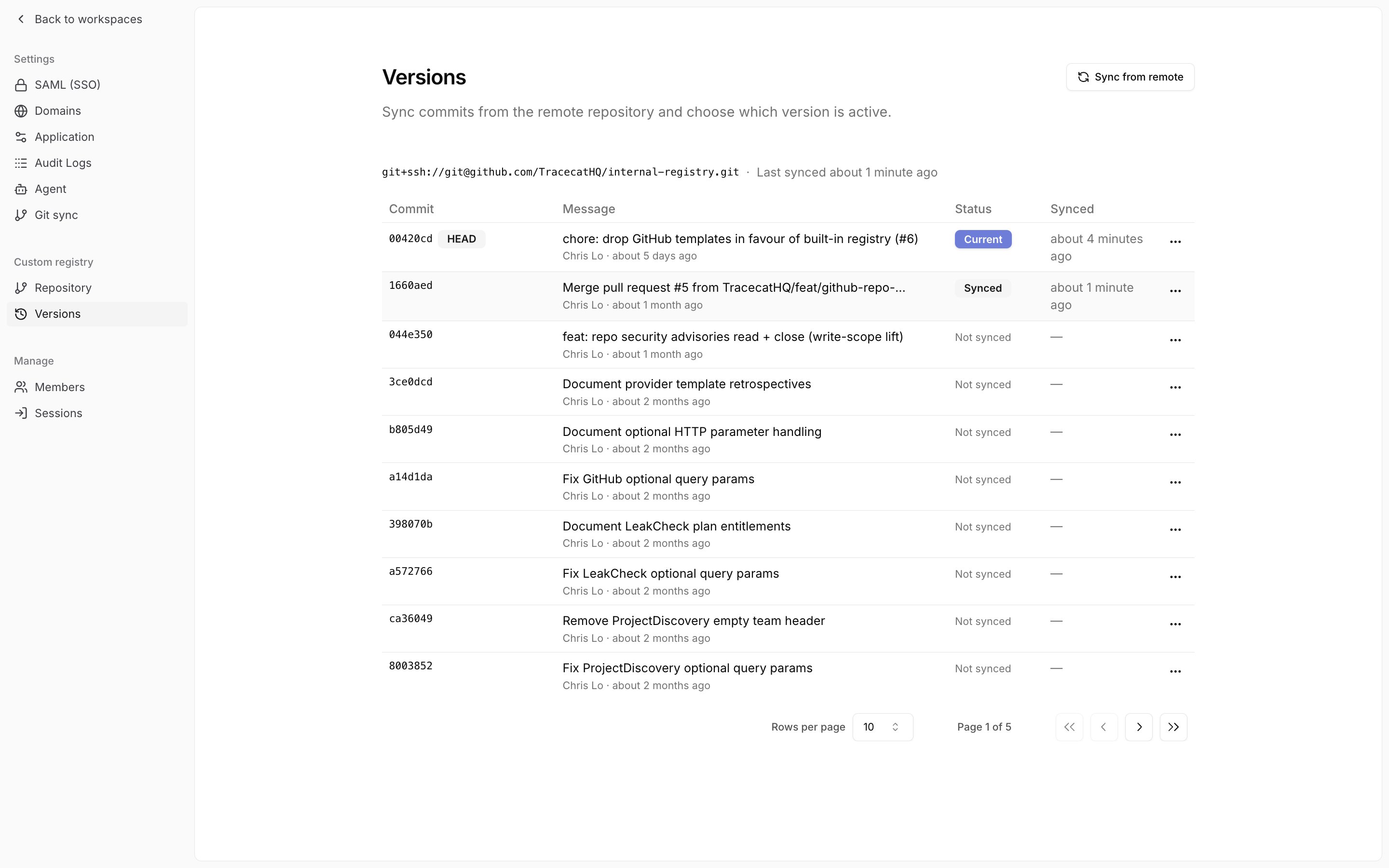
 Go to Organization settings -> Custom registry -> Versions.
The table lists the commits on the branch named by the repository URL's `@ref` suffix (`main` when absent), newest first, with a `HEAD` badge on the latest.
Click "Sync from remote" in the page header and confirm to sync `HEAD`.
If the page shows an SSH error, check that the SSH key section on the Repository page lists `github-ssh-key` and that its public key is installed on the repository.
Go to Organization settings -> Custom registry -> Versions.
The table lists the commits on the branch named by the repository URL's `@ref` suffix (`main` when absent), newest first, with a `HEAD` badge on the latest.
Click "Sync from remote" in the page header and confirm to sync `HEAD`.
If the page shows an SSH error, check that the SSH key section on the Repository page lists `github-ssh-key` and that its public key is installed on the repository.
 ## Manage versions
Each sync creates a version pinned to its source commit.
On the Versions page, every row shows the commit, its message and author, its status (`Current`, `Synced`, or `Not synced`), and when you last synced it.
Open the row menu to act on a version.
## Manage versions
Each sync creates a version pinned to its source commit.
On the Versions page, every row shows the commit, its message and author, its status (`Current`, `Synced`, or `Not synced`), and when you last synced it.
Open the row menu to act on a version.
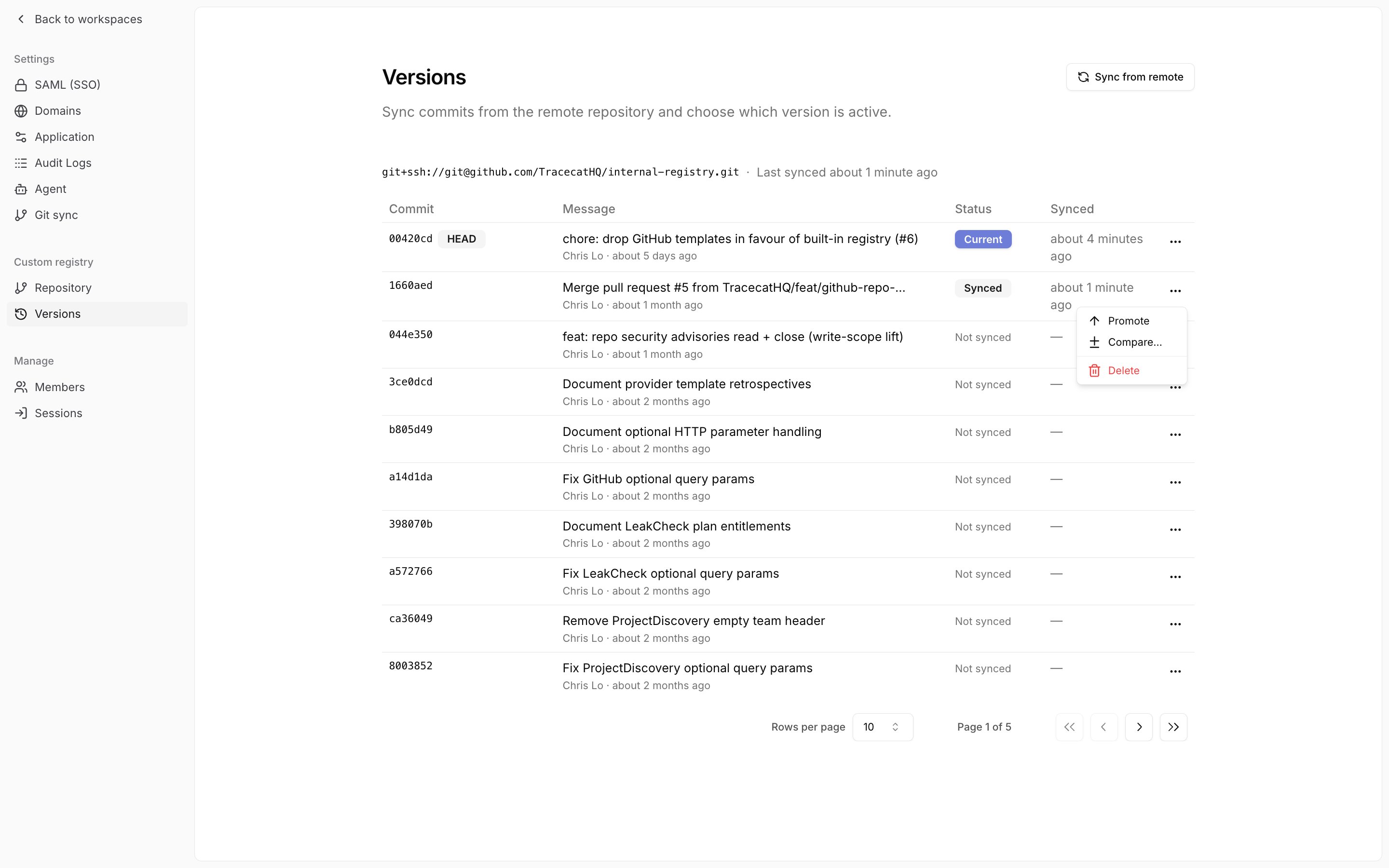 * "Sync this commit" syncs a commit you have not synced yet.
* "Promote" makes an already-synced version the current one. Promote an earlier version to roll back.
* "Compare..." shows the actions added, removed, and modified between two versions.
* "Delete" removes a synced version. Tracecat blocks deletion of the current version and of any version that published workflows use.
Synced versions whose commit no longer appears in the commit list are grouped under "Other synced versions" below the table, with the same row menu.
## How custom registry works
When you sync a registry, Tracecat:
* Pulls the latest code from the remote repository
* Converts the package and its dependencies into a tarball using `uv`
* Uploads the tarball to S3-compatible object storage
* Tarballs are stored in the bucket specified in the `TRACECAT__BLOB_STORAGE_BUCKET_REGISTRY` environment variable
Published workflows run actions synced at the time of publication.
When triggered, the Tracecat executor pulls the pinned version of the platform registry and custom registry tarballs from S3.
You must republish a workflow to use the latest platform and custom actions.
Even if there were no changes to the workflow itself.
## FAQ
Yes. Tracecat works with Gitlab and GitHub Enterprise.
Yes. The package name from the starter kit is `custom_actions`.
To rename it, you'll need to rename the:
* `custom_actions` folder to `my_new_package_name`
* Project name in `pyproject.toml` to `my_new_package_name`
Note: Python package names must be snake\_case.
Yes. You can rename the git repo. It does not need to have the same name as the Python package.
You must specify new dependencies in the `dependencies` section of the `pyproject.toml` file.
Yes. For local Docker deployments, you can hot reload custom actions into Tracecat with a local registry.
See [local development](/custom-actions/local-development) for more details.
* "Sync this commit" syncs a commit you have not synced yet.
* "Promote" makes an already-synced version the current one. Promote an earlier version to roll back.
* "Compare..." shows the actions added, removed, and modified between two versions.
* "Delete" removes a synced version. Tracecat blocks deletion of the current version and of any version that published workflows use.
Synced versions whose commit no longer appears in the commit list are grouped under "Other synced versions" below the table, with the same row menu.
## How custom registry works
When you sync a registry, Tracecat:
* Pulls the latest code from the remote repository
* Converts the package and its dependencies into a tarball using `uv`
* Uploads the tarball to S3-compatible object storage
* Tarballs are stored in the bucket specified in the `TRACECAT__BLOB_STORAGE_BUCKET_REGISTRY` environment variable
Published workflows run actions synced at the time of publication.
When triggered, the Tracecat executor pulls the pinned version of the platform registry and custom registry tarballs from S3.
You must republish a workflow to use the latest platform and custom actions.
Even if there were no changes to the workflow itself.
## FAQ
Yes. Tracecat works with Gitlab and GitHub Enterprise.
Yes. The package name from the starter kit is `custom_actions`.
To rename it, you'll need to rename the:
* `custom_actions` folder to `my_new_package_name`
* Project name in `pyproject.toml` to `my_new_package_name`
Note: Python package names must be snake\_case.
Yes. You can rename the git repo. It does not need to have the same name as the Python package.
You must specify new dependencies in the `dependencies` section of the `pyproject.toml` file.
Yes. For local Docker deployments, you can hot reload custom actions into Tracecat with a local registry.
See [local development](/custom-actions/local-development) for more details.