

Overview
Tracecat supports built-in OAuth integrations and custom OAuth providers. OAuth integrations expose tokens through secret expressions.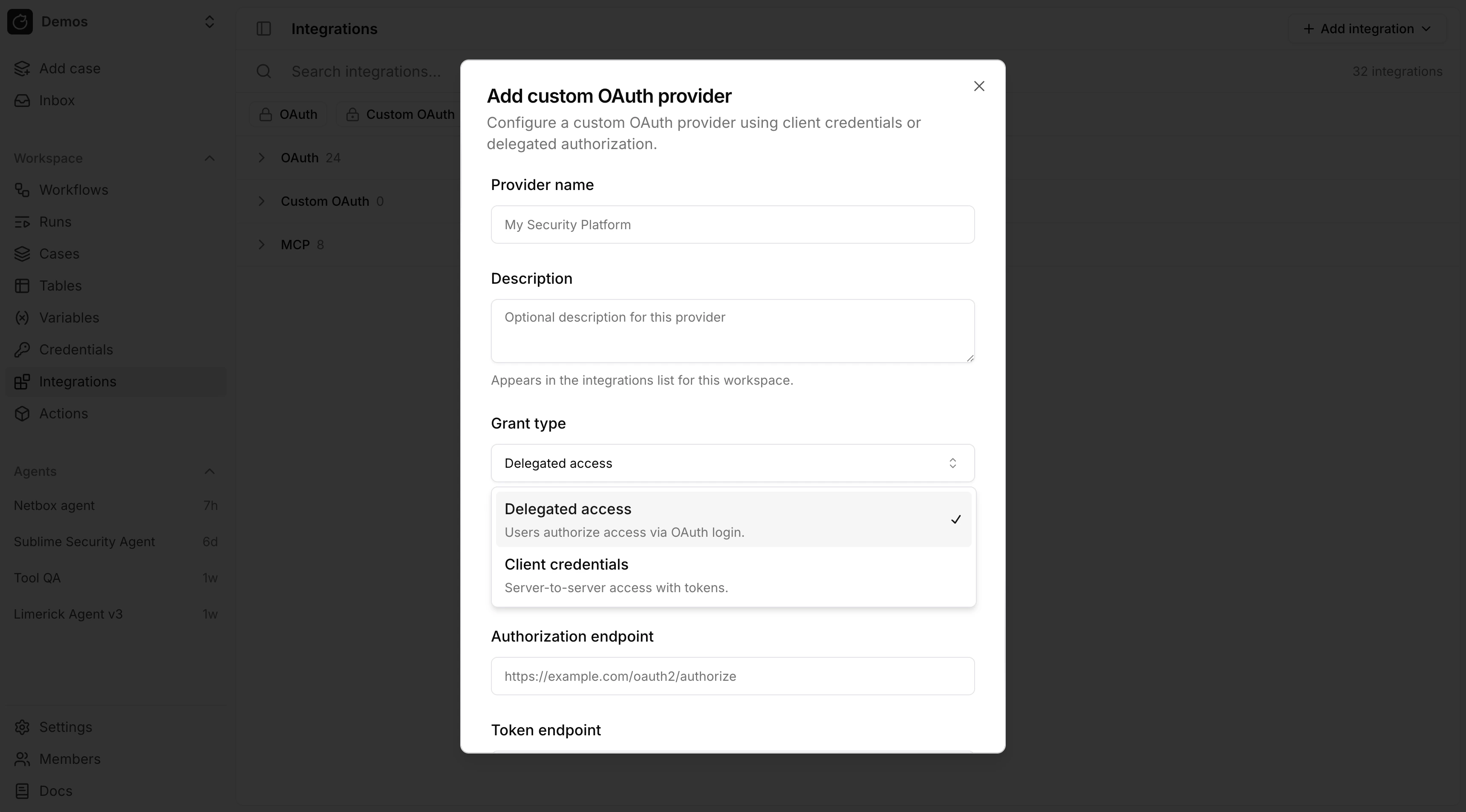
Grant types
OAuth grant types:- Delegated access (
authorization_code): Tracecat stores a user token after a user completes the OAuth login flow. - Client credentials (
client_credentials): Tracecat stores a service token for server-to-server access.
Configure a provider
Built-in OAuth integrations are listed on the Integrations page. For custom OAuth, use Add integration → OAuth provider (or Add custom OAuth provider under Custom OAuth). Most providers require these fields:- Client ID
- Client secret
- Authorization endpoint
- Token endpoint
- Scopes
Redirect URI
Delegated access (authorization_code) requires a redirect URI registered in the provider’s OAuth app. Tracecat uses one redirect URI for every OAuth provider, built-in or custom:
PUBLIC_APP_URL is the URL you use to reach the Tracecat UI (https://platform.tracecat.com/integrations/callback on Tracecat Cloud). Self-hosted deployments set it through the TRACECAT__PUBLIC_APP_URL environment variable; see Environment variables. The integration’s configuration dialog also shows the exact value with a copy button.
Register the URI as a Web platform redirect URI (reply URL) in the provider’s app registration before you connect. If it is missing or does not match exactly, the provider rejects the login flow. Microsoft Entra ID reports this as AADSTS900971: No reply address provided or AADSTS50011: The redirect URI specified in the request does not match.
Client credentials (client_credentials) has no login flow and needs no redirect URI.
Use OAuth tokens in expressions
OAuth expressions use the provider’s exact ID, not its display name.- Built-in providers use stable lowercase IDs assigned by Tracecat, with
underscores between words, such as
slack,google_drive, andmicrosoft_sentinel. - Custom providers use an ID derived from the provider name, or from the
requested ID when you create one through the API. Tracecat slugifies it with
underscores and prepends
custom_.My Security APIbecomescustom_my_security_api. If that ID is already used for the same grant type, Tracecat appends_1,_2, and so on.
_oauth to the exact provider ID for the secret name. For the key,
uppercase the complete provider ID, preserve its underscores and any numeric
suffix, then append _USER_TOKEN for authorization_code or _SERVICE_TOKEN
for client_credentials.
google_drive authorization-code provider and a custom
custom_my_security_api client-credentials provider resolve as:
Tracecat refreshes expiring authorization-code tokens when the provider
issued a refresh token, and reacquires client-credentials tokens with the
stored client credentials. The expression resolves only to the current
access-token string, which may be a JWT or an opaque token, not the refresh
token.
OAuth and actions
Registry actions reference OAuth integrations but do not create them. Configure a built-in or custom provider in Integrations first, then declareRegistryOAuthSecret (Python) or type: oauth (YAML) so the action requires that integration at runtime. See the OAuth declaration syntax and examples for Python UDFs and YAML templates.
OAuth and MCP
Remote MCP integrations can use an existing OAuth integration. For custom remote MCP servers:- Create a custom OAuth provider.
- Connect that provider.
- Create an MCP integration and attach the connected OAuth integration.
FAQ
Can my custom action create an OAuth integration?
Can my custom action create an OAuth integration?
No.
RegistryOAuthSecret and YAML type: oauth entries declare that the action requires an existing OAuth integration — they do not register one. Create the integration from Configure a provider (or contribute a built-in provider). Once it exists, your action can reference its tokens via ${{ SECRETS.<provider_id>_oauth... }}.How do I contribute a built-in OAuth provider?
How do I contribute a built-in OAuth provider?
Out-of-the-box providers are implemented in the Tracecat app and get stable IDs (for example
slack, google_drive) without the UI custom_ rule.- Subclass
AuthorizationCodeOAuthProviderorClientCredentialsOAuthProviderundertracecat/integrations/providers/. Seeslack/oauth.pyfor a full example. - Register the class in
_PROVIDER_CLASSES. - Keep the registry package aligned: same
provider_idandgrant_typeinRegistryOAuthSecret(Python) andtype: oauthentries (YAML) so actions resolve the same integration as the UI.
Related pages
- See Prebuilt credentials for static credentials such as API keys and bot tokens.
- See Secrets for how secret expressions are resolved at runtime.
- See Python UDFs and YAML templates for custom registry actions.
- See MCP servers for remote and
stdioMCP setup.